
Appointment Booking Automation
Fill Your Calendar Without Lifting a Finger
Our Appointment Booking Automation lets plumbing and HVAC customers schedule service instantly — confirming time slots, sending reminders, and keeping your technicians’ calendars full without a single manual phone call.
Stop losing jobs to scheduling delays — let customers book instantly, any time
The Appointment Booking Automation removes the back-and-forth that slows down scheduling for plumbing and HVAC businesses. The moment a customer is ready to book — whether from a website form, a missed call follow-up, or a quote acceptance — they’re instantly offered available time slots based on real technician availability. No phone tag, no double-booking, no waiting for someone in the office to manually check the calendar.
Why it matters: Every unbooked slot is lost revenue
In plumbing and HVAC, technician time is your most valuable resource. An empty slot on the schedule because a lead never got a callback, or a missed reminder that caused a no-show, directly costs your business money.
Appointment Booking Automation keeps your calendar working for you around the clock — capturing bookings after hours, confirming appointments instantly, and reducing no-shows with timely reminders, so your technicians stay productive and your revenue stays predictable.
The Problem
A customer wants to book a service call. They call your office, it goes to voicemail, and by the time someone calls back, they’ve already booked with a competitor who answered first.
- Customers can only book during office hours, missing after-hours demand
- Manual scheduling leads to double bookings and technician conflicts
- No automated reminders means high no-show rates and wasted technician time
- Office staff spend hours each week just coordinating calendars over the phone
- Leads go cold while waiting for a callback to confirm appointment availability
The Solution: Let customers book themselves, any time of day
Customers view real-time technician availability and book instantly online
Appointment is confirmed automatically with no manual approval needed
Automated reminders sent before the appointment reduce no-shows
Assigned technician is notified instantly with full job details
Schedule stays optimized, reducing drive time and improving daily capacity
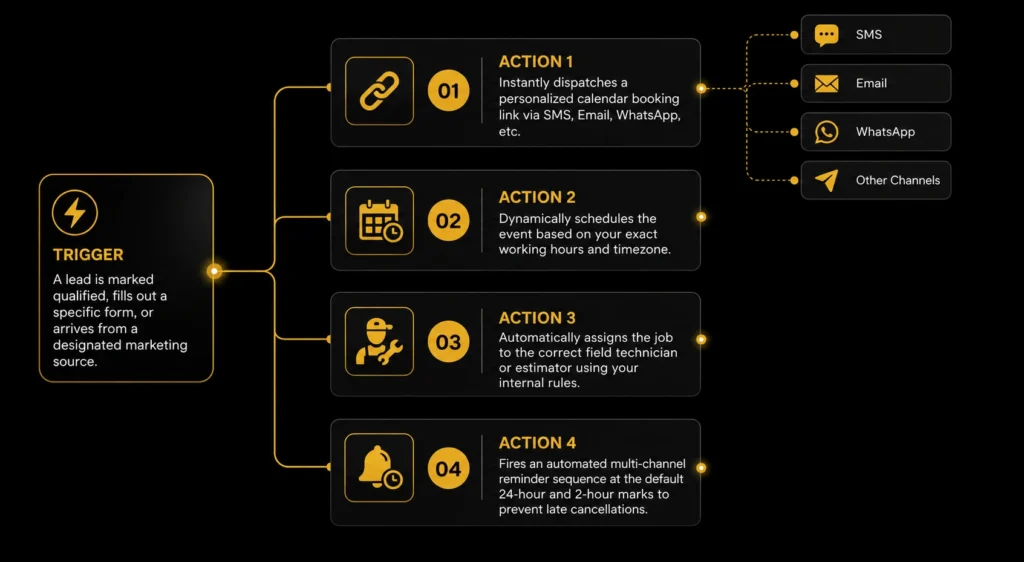
One Trigger. Four Instant Actions.
The moment a qualified lead requests an appointment, the autAomation instantly schedules the next steps—sending booking links, assigning the right technician, and delivering timely reminders. Every appointment is organized automatically, helping your team reduce manual scheduling, prevent missed bookings, and deliver a seamless customer experience.
Our process
How It Works
The moment a customer is ready to book, six things happen automatically — filling your calendar without any manual coordination from your team.

Slot Requested
Customer views available times and selects a slot instantly.

Booking Confirmed
Appointment is locked in automatically, no manual approval.

Tech Notified
Assigned technician receives job details and location instantly.

Reminder Sent
Automated reminder sent to the customer before the visit.

CRM Updated
Appointment logged and synced across your scheduling tools.

Service Completed
Technician completes the job and the system updates status.
Business Benefits
Why Businesses Use This Automation
Appointment Booking Automation keeps your technicians’ calendars full without tying up office staff on the phone all day. By letting customers book instantly, confirming automatically, and reducing no-shows with reminders, your business maximizes every working hour and captures bookings even when the office is closed.
Capture bookings 24/7
Customers can book service any time of day or night, even when your office is closed.
Reduce no-shows automatically
Timed reminders before each appointment significantly cut down on missed visits and wasted technician trips.
Free up your Office team
No more hours spent on the phone coordinating calendars; customers book themselves in seconds.
Maximize technician efficiency
Optimized scheduling keeps your team's calendar full and reduces wasted drive time between jobs.
Requirements
What we need from you
Provide your business hours, availability, team assignment rules, reminder preferences, and booking trigger settings so we can automate appointment scheduling and ensure every lead is booked at the right time.
Working hours, timezone, and appointment availability.
Technician or team assignment rules based on service, location, or availability.
Configure appointment reminder intervals (default: 24 hours and 2 hours before).
Define when booking links are sent, such as for new leads, specific forms, or selected lead sources.
Customer Journey
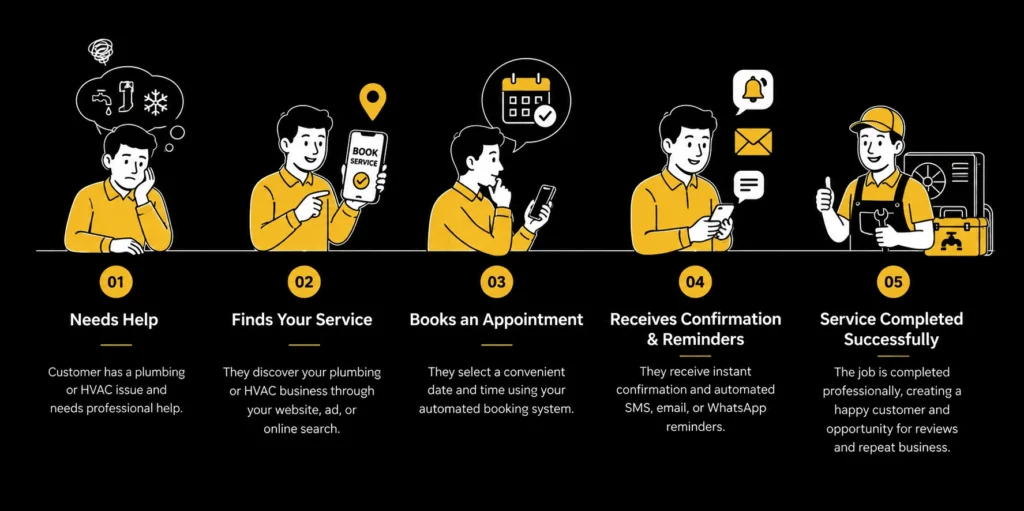
Appointment Booking Automation Customer Journey
See how every qualified prospect is guided from expressing interest to booking an appointment automatically. The system sends personalized booking links, schedules appointments based on your availability, assigns the right technician or estimator, and delivers timely reminders—creating a smooth, hassle-free experience for both your team and your customers.

Need Help? We’ve Got Answers
Yes. The booking system is available 24/7, allowing customers to schedule service any time — even late at night or on weekends — without waiting for office hours to call in.
The automation checks real-time technician availability before confirming any booking, so customers can only select time slots that are genuinely open — eliminating scheduling conflicts entirely.
Yes. Customers can reschedule or cancel directly through the confirmation link, and the system automatically updates the technician's calendar and notifies the team of the change.
You can configure reminders to be sent via SMS or email at custom intervals — commonly 24 hours and 1 hour before the appointment — to minimize no-shows and keep customers informed.
The automation syncs with your existing CRM and scheduling tools in real time, ensuring your calendar stays accurate across every platform your team uses.
Turn Every Inquiry Into a Confirmed
Appointment
Automate scheduling, send timely reminders, and keep your calendar full
with seamless appointment booking workflows.