
Project Documents Collection
Stop Chasing Paperwork — Let Documents Collect Themselves
Missing permits, unsigned waivers, and outstanding insurance certificates can stall a project before it even starts. Our Project Documents Collection Automation requests, tracks, and organizes every required document automatically, so your team always has what it needs without a single follow-up call.
Stop delaying projects over missing paperwork — collect every document automatically
The Project Documents Collection Automation takes the chasing out of paperwork entirely. The moment a project is created, the system identifies exactly which documents are required — contracts, permits, insurance certificates, lien waivers, or homeowner authorizations — and automatically sends requests to the right person, whether that’s the customer, a subcontractor, or a vendor.
Why it matters: Missing paperwork is one of the most common causes of project delays
For general contractors, a project can be fully staffed and ready to go, yet still stall for days because a permit hasn’t been filed, an insurance certificate hasn’t been received, or a signed waiver is sitting in someone’s inbox. These delays are rarely about the work itself — they’re about paperwork that nobody had time to chase down.
Project Documents Collection Automation removes that bottleneck completely. Every document request goes out automatically, every submission is tracked, and every gap is flagged before it can hold up the schedule — keeping your projects moving on time, every time.
The Problem
A crew is ready to start on Monday, but the homeowner never returned the signed authorization form, and nobody on your team realized it was missing until the truck was already at the curb.
- Document requests are sent manually and often forgotten in the rush of daily work
- No central tracking system shows which documents are received and which are missing
- Subcontractors and vendors are chased individually through scattered phone calls and emails
- Projects start late or get paused because a required permit or waiver wasn't collected in time
- Files arrive through different channels and get lost across emails, texts, and paper copies
The Solution: Automatically request, track, and organize every document
Required document list is generated automatically based on project type and scope
Requests are sent automatically to customers, subcontractors, and vendors as needed
Submitted documents are organized into the correct project folder automatically
System tracks completion status and flags any outstanding or missing items
Automated reminders are sent before deadlines to prevent last-minute delays
One Trigger. Eight Intelligent Actions.
The moment a new project record is created, the system automatically identifies which documents are required and begins daily verification checks. It reviews submitted paperwork every day at your scheduled time, flags anything still missing, and sends reminder notifications to the customer until everything is in.
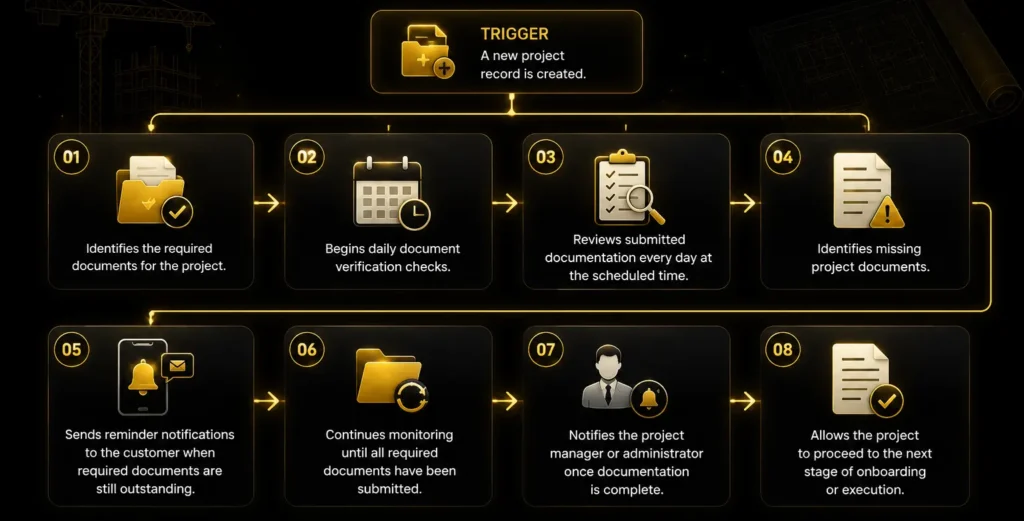
Our process
How It Works
The moment a project is created, six things happen automatically — ensuring every required document is requested, tracked, and collected without manual chasing.

Requirements Identified
System determines which documents are needed for the project type.

Requests Sent
Automatic requests go out to customers, subs, and vendors.

Documents Tracked
Submission status is monitored against the requirements list.

Files Organized
Received documents are filed into the correct project folder.

Reminders Sent
Outstanding items trigger automated follow-up reminders.

Team Alerted
Project manager is notified once all documents are complete.
Business Benefits
Why Businesses Use This Automation
Project Documents Collection Automation removes one of the most common causes of project delays. By automatically requesting, tracking, and organizing every required document, your business avoids last-minute scrambles, keeps projects on schedule, and gives your team complete visibility into documentation status at every stage.
Eliminate last-minute delays
Every required document is requested and tracked from day one, preventing surprises at project start.
Stop manually chasing paperwork
Automated requests and reminders replace hours of phone calls and follow-up emails.
Keep everything organized in one place
Documents are filed automatically into the correct project folder as soon as they're received.
Reduce compliance risk
Missing insurance certificates, permits, or waivers are flagged before they become a liability issue.
Requirements
What we need from you
Follow the complete journey from project creation to fully verified documentation. See how your checklist, contact info, and notification channels work together to chase down missing documents automatically—so nothing holds up onboarding.
Project records or custom objects set up, so the system knows when a new project starts and what to track.
Your required document checklist and industry-specific document requirements, so the system knows exactly what to verify for each project type.
Accurate customer contact information, so reminders reach the right person every time.
Your preferred notification channels (SMS, Email, WhatsApp, etc.), so reminders go out the way your customers actually respond to.
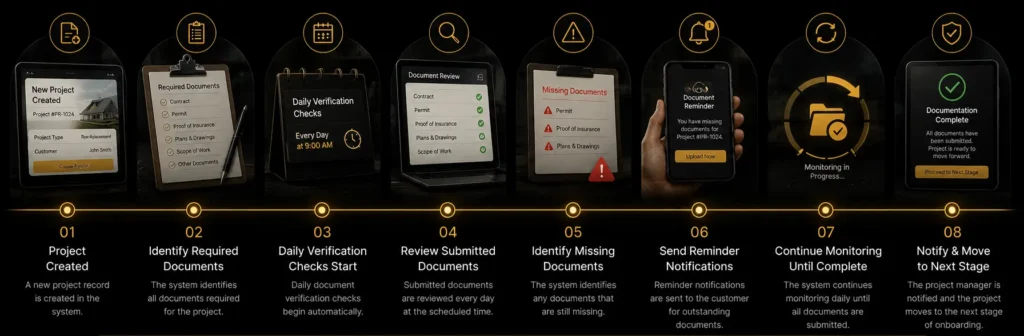
Customer Journey
From Project Creation to Documentation Complete Journey
See how Project Document Collection Automation keeps every project moving by automatically requesting, tracking, and verifying required documents—ensuring nothing is missing before work begins.

Need Help? We’ve Got Answers
The automation uses project type, scope, and location to determine the required documentation, pulling from a customizable checklist you define for residential, commercial, or specialty projects.
Requests are sent to whoever is responsible for each document — customers for contracts and authorizations, subcontractors for insurance and licenses, and vendors for permits or compliance paperwork.
The system automatically flags incomplete or expired submissions and sends a follow-up request specifying exactly what's needed to resolve the issue.
Yes. Document checklists are fully customizable, allowing you to set different requirements for residential remodels, commercial builds, or specialty projects based on your business needs.
The assigned project manager receives an automatic notification once every required document has been submitted and verified, confirming the project is fully cleared to proceed.
Stop Chasing Permits, Contracts,
and Paperwork by Hand
From permits to signed contracts, this automation checks daily for outstanding
documents, reminds clients automatically, and alerts your PM the second the file is
complete.